Structuring Element
Morphological operations are based around a kernel, which represents the shape and size of the neighborhood that will be sampled when calculating the pixel values to be modified. The basic idea is that a window of some finite size and shape — the kernel — is scanned across the image. The output pixel value is the weighted sum of the input pixels within the window where the weights are the values assigned to every pixel of the window itself.
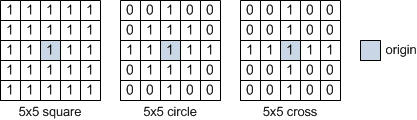
Various standard kernels are provided for morphological operations and the size and the shape of the kernel determine the characteristics of the operation. A simple 5 x 5 structuring element and the shapes available for 2D interpretation are shown below.
Simple structuring elements
You should note that the size of the neighborhood controls the strength of the applied operator.